


Spring Boot集成Redis
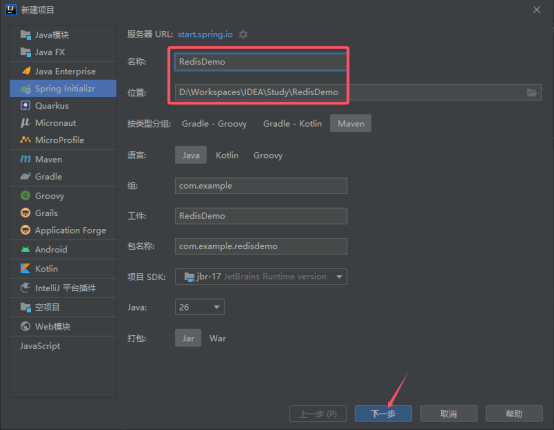
- 创建项目
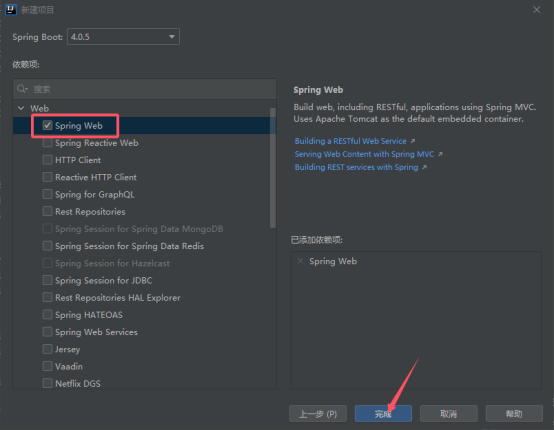
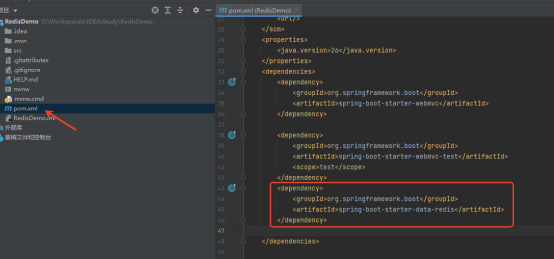
2、引入 spring-boot-starter-redis
<dependency>
<groupId>org.springframework.boot</groupId>
<artifactId>spring-boot-starter-data-redis</artifactId>
</dependency>
3、修改配置文件
将application.properties改成application.yml,添加如下配置
spring:
data:
redis:
# Redis数据库索引(默认为0)
database: 0
# Redis服务器地址
host: localhost
# Redis服务器连接端口
port: 6379
# Redis服务器连接密码(默认为空)
password:
# 连接超时时间
timeout: 2000ms
4、添加Redis的配置类
package com.example.redisdemo;
import org.springframework.boot.autoconfigure.condition.ConditionalOnClass;
import org.springframework.context.annotation.Bean;
import org.springframework.context.annotation.Configuration;
import org.springframework.data.redis.connection.RedisConnectionFactory;
import org.springframework.data.redis.core.RedisTemplate;
import org.springframework.data.redis.core.StringRedisTemplate;
import org.springframework.data.redis.serializer.RedisSerializer;
import org.springframework.data.redis.serializer.StringRedisSerializer;
@Configuration
@ConditionalOnClass(RedisConnectionFactory.class)
public class RedisConfig {
@Bean
public RedisTemplate<String, Object> redisTemplate(RedisConnectionFactory factory) {
RedisTemplate<String, Object> template = new RedisTemplate<>();
template.setConnectionFactory(factory);
// 使用 StringRedisSerializer 序列化 key
StringRedisSerializer stringRedisSerializer = new StringRedisSerializer();
template.setKeySerializer(stringRedisSerializer);
template.setHashKeySerializer(stringRedisSerializer);
// 使用 RedisSerializer.json() 序列化 value(Spring Data Redis 3.x+ 推荐方式)
template.setValueSerializer(RedisSerializer.json());
template.setHashValueSerializer(RedisSerializer.json());
template.afterPropertiesSet();
return template;
}
@Bean
public StringRedisTemplate stringRedisTemplate(RedisConnectionFactory factory) {
return new StringRedisTemplate(factory);
}
}
5、创建Service
package com.example.redisdemo;
import org.springframework.data.redis.core.RedisTemplate;
import org.springframework.stereotype.Service;
import java.util.concurrent.TimeUnit;
@Service
public class RedisStringService {
private final RedisTemplate<String, Object> redisTemplate;
public RedisStringService(RedisTemplate<String, Object> redisTemplate) {
this.redisTemplate = redisTemplate;
}
// 设置值
public void set(String key, Object value) {
redisTemplate.opsForValue().set(key, value);
}
// 设置带过期时间的值(秒)
public void setWithExpire(String key, Object value, long timeout) {
redisTemplate.opsForValue().set(key, value, timeout, TimeUnit.SECONDS);
}
// 获取值
public String get(String key) {
return (String)redisTemplate.opsForValue().get(key);
}
}
6、创建Controller
package com.example.redisdemo;
import org.springframework.web.bind.annotation.GetMapping;
import org.springframework.web.bind.annotation.RequestParam;
import org.springframework.web.bind.annotation.RestController;
@RestController
public class RedisController {
private final RedisStringService redisStringService;
public RedisController(RedisStringService redisStringService) {
this.redisStringService = redisStringService;
}
@GetMapping(“/get”)
public String get(@RequestParam String key) {
return redisStringService.get(key);
}
@GetMapping(“/set”)
public String set(@RequestParam String key,@RequestParam String value) {
// redisStringService.set(key,value);
redisStringService.setWithExpire(key,value,10);
return “Success”;
}
}
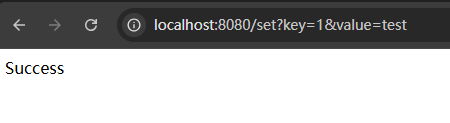
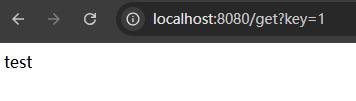
- 运行并测试